The Creative Overlay Menu in Elementor — A Full-Screen Menu That Shows Off
Reboot Addons' Creative Overlay Menu: a full-screen Elementor menu with kicker, headline, CTA and eleven animated surface options. No custom ...



Reboot Addons' Creative Overlay Menu: a full-screen Elementor menu with kicker, headline, CTA and eleven animated surface options. No custom ...

R749, R999, R1499 or R1999 a month — what each Reboot Websites package actually builds, and why the gap between ...

Advanced Text FX gives you 58 text-in effects in one Elementor widget — scramble, typewriter, glitch, neon, and a whole ...

Seven content widgets plus all six form stylers that build card effects, carousels, and styled forms without writing JS. Widget ...

Every site I build has a link that clients never click. I know. So does the client, in a vague way. And every single one of those pages is /wp-login.php, which means every one of my sites has a grey WordPress login box sitting on the front footpath, waiting to be found. And honestly? It’s a bit embarrassing, on a client site that took weeks to design properly — the front door looks like it belongs on a 2009 forum.
The thing about that default login page nobody talks about: it’s the first URL a scanner hits when it finds your site, and the last thing a designer looks at when they’re building a client site. So it stays default. Everyone’s does. It’s a quiet little “yes, this runs WordPress” flag hanging on a site that otherwise looks like it cost more than it should.
The Login Stylizer in Reboot Addons is a visual designer for wp-login.php. Not a CSS file you beg a theme to inherit. A visual designer — you open it, you see a live preview next to the controls, you move things, they change. Logo, background (colour, gradient, image, or video), the form card, the fields, the button, the footer and social links, the animations.
I actually counted the panel one evening, mostly because 219 controls is a number I wanted on the record. Eleven sections. The Fields & Labels section alone has 54 of them.
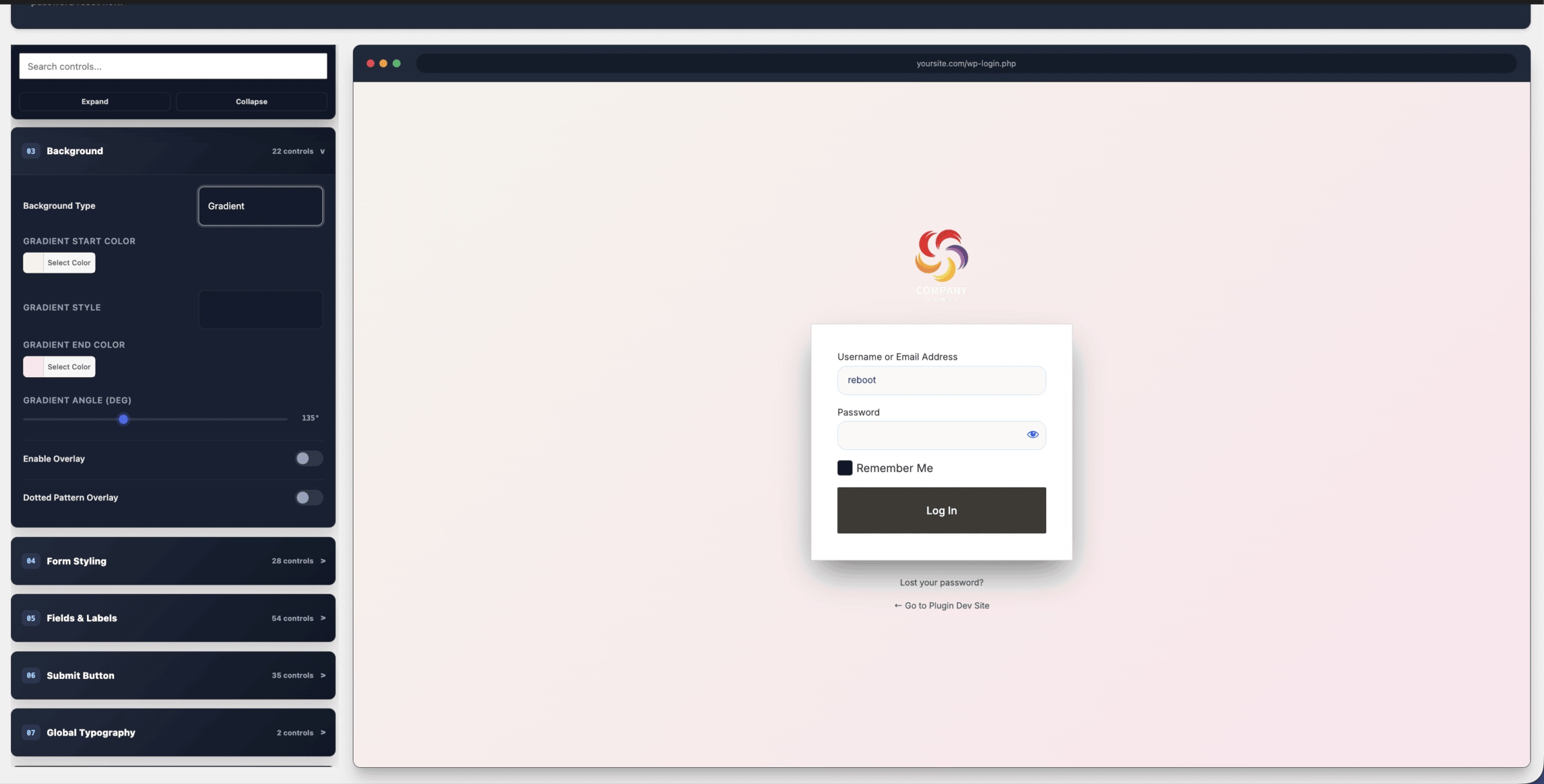
The default WordPress login is functional, sure. It’s just that functional is doing a lot of heavy lifting for a front door. You can get to this — the dark, logo’d, properly designed version of your login page with your name on it — in the time it takes to make a second coffee.

You can start from scratch and use all 219 controls — that’s fine, they’re there. Or pick one of the five free starter themes that ship with it. They’re not the purple-gradient-login-page cliché you’ve probably seen on every other “branded login” plugin. They actually look designed. Because they were — not generated by a settings panel somebody gave up on.
All five are in the free version. You install it, you pick a theme, you tweak the logo and the colour, you’re done. That’s the whole job, and it doesn’t need Elementor Pro, and it doesn’t need a developer day. And if you want more themes, pro expands that set. But the free core isn’t a demo. It’s the real thing.
Run client sites and you already know the problem. You’ve got seven WordPresses on seven domains, and you want the same brand on every single one of their login pages. The “proper” way to do that is to re-do the login styling on each one. Seven times. And then when the brand changes, seven more times.
So here’s the move: design it once, in the stylizer, the way you actually want it to look. Save the design. Export it. Import it on the other six. Your five client sites now have matching branded logins. And when you rebrand next year, you change one design and push it to all of them.
That export/import bar sits right there at the top of the panel — save design, export, import. You see it in the shot.

It also plugs into reCAPTCHA v2 and v3 if you want it on the login, handles the redirect after sign-in, and here is one that you should actually check — it doesn’t break the native password reset flow. Because the worst “branded login page plugin” I’ve ever seen is the one that also broke a client’s “I forgot my password” link. That one’s preserved and working. That matters more than any control in this plugin, to be honest.
No. The plugin works with the free Elementor. The login stylizer itself doesn’t require Elementor at all — that’s a separate feature of the pack. You install free, it works on whatever theme you’re on.
No. The whole plugin is built to keep the native WordPress auth flow fully functional — reset, redirect, captcha, the lot. The styling layer sits on top, doesn’t replace it.
Yes, that’s the point of the export/import toolbar. Design it once, export, import on the next site. When you rebrand, you do it once and push to all of them. If you run a handful of client sites, this alone is worth the install. Free, by the way. The core designer, the five free themes, export, import — all of that’s in the free version. Pro expands the theme count and adds more controls.
It’s a free download, in the WordPress plugin directory under Reboot Addons by Reboot Websites. Install it, open the login stylizer, and in about five minutes your /wp-login.php is branded, dark, and looks like you spent a day on it. You spent a coffee. And that front door finally looks like the rest of the site it belongs to.

One more thing. The design exports as a file, so you set it up once and drop the same login screen onto every other site you look after.