The Creative Overlay Menu in Elementor — A Full-Screen Menu That Shows Off
Reboot Addons' Creative Overlay Menu: a full-screen Elementor menu with kicker, headline, CTA and eleven animated surface options. No custom ...



Reboot Addons' Creative Overlay Menu: a full-screen Elementor menu with kicker, headline, CTA and eleven animated surface options. No custom ...

R749, R999, R1499 or R1999 a month — what each Reboot Websites package actually builds, and why the gap between ...

Advanced Text FX gives you 58 text-in effects in one Elementor widget — scramble, typewriter, glitch, neon, and a whole ...
Seven content widgets plus all six form stylers that build card effects, carousels, and styled forms without writing JS. Widget ...
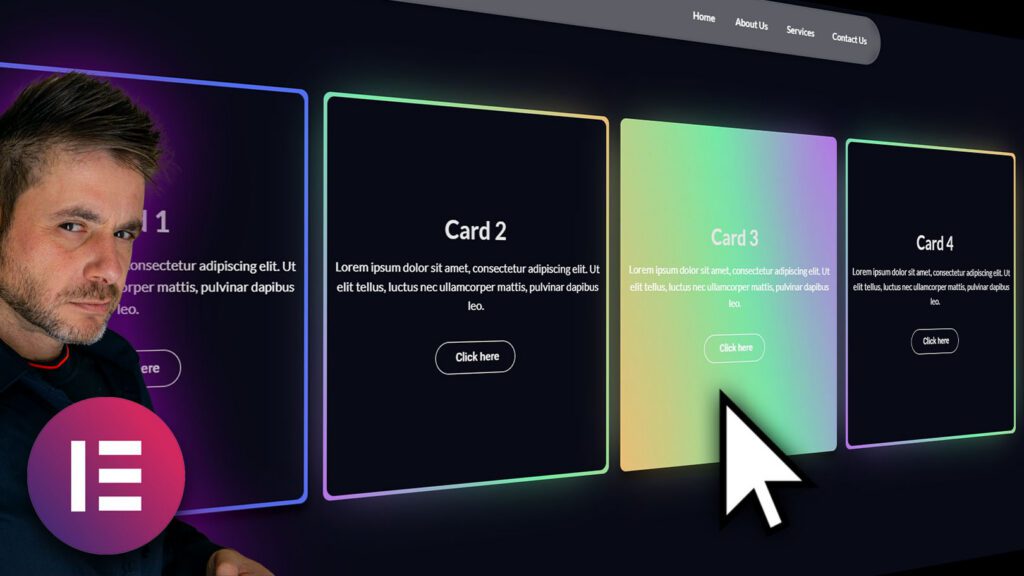
Every other SaaS and agency site has it now. Those cards with the bright gradient edge that seems to follow your mouse. That one card that just glows a different colour while the ones around it stay quiet. Someone on the call asks for it. Every single time.
And then a dev looks at it and sighs, because nailing that effect properly means a GSAP build, a bit of fiddly radial-gradient math, and a prayer that it doesn’t tank the frame rate on a mid-range phone. So it ships in your head and never in the site.

Glow Cards is a Reboot Addons Pro widget. It runs on free Elementor. Here is the free version you can install right now.
Strip away the marketing and it’s three things layered on top of each other. A dark card. A soft glow blob sitting behind it, blurred out until it reads as a halo of colour. And a glass fill on top that frosts whatever is behind the card, so the glow doesn’t turn into a flat painted rectangle. Get the layering wrong and it just looks like a badly tinted box. Get it right and it looks expensive.

I’d rather show you how it actually moves than hand you a screenshot and call it a day. The glow is a blurred gradient element that eases toward your cursor the moment it moves. It’s a transform, not a repaint, so it stays on the compositor’s fast path. No layout thrash, no jank when the pointer is going fast. That is the whole reason it doesn’t look cheap on a phone.
Now here’s the part that used to cost me an afternoon. Hand-rolling it means all of this, per card:

With the widget you’re not writing any of it. You’re setting values. Global glow colour, per-card glow colour if you want one card to break the pattern, blob size, and blob softness, which is just the blur radius in nicer words. Glass frosting, which is the backdrop blur, if your site is already loading the libraries for it. I’ll be straight with you: that one is the part you leave off on a site that isn’t already animation-heavy, and it still looks good without it.
A glow card is a design element, not a single element. You want them in a grid, and you want the grid to behave. Columns, grid gap, force equal height so the cards don’t end up like a broken mosaic of different heights. That’s the difference between a hero section and a mess. It all sits in the same panel, so you set the effect and the layout in one breath.

It’s a Reboot Addons Pro widget. Reboot Addons itself ships 13 widgets free, in the WordPress repo, and this is one of the ones that’s in the Pro half.
No. It works on the free Elementor. That is the point I always make, because most of the widget packs I’ve seen quietly require Elementor Pro behind them. This one does not.
No. There’s a glass frosting control and a background colour, so light cards work too. One real gotcha I keep hitting in builds: keep the inner containers transparent, or they sit on top of the glow and you just get a flat box. That’s a layout thing, not a bug.
Yes. There’s a global glow colour, and each card can override it. That’s how you get the one bright card in a row of quiet ones, which is the exact look most of these landing pages are after.
It’s the effect every client points at and every dev quietly dreads. Now it’s a widget with a panel.
Reboot Addons runs 13 widgets on free Elementor, and Glow Cards is in the Pro half. Try the free version first.